

Before you begin
- Labs create a Google Cloud project and resources for a fixed time
- Labs have a time limit and no pause feature. If you end the lab, you'll have to restart from the beginning.
- On the top left of your screen, click Start lab to begin

Prepare a source PostgreSQL database for migration.
/ 20
Migrate a stand-alone PostgreSQL database to Cloud SQL.
/ 20
Promote a Database Migration Services continuous replica to a stand-alone instance.
/ 20
Secure a Cloud SQL database table using IAM authentication.
/ 20
Enable and test Point-in-Time Recovery.
/ 20

In a challenge lab you’re given a scenario and a set of tasks. Instead of following step-by-step instructions, you will use the skills learned from the labs in the course to figure out how to complete the tasks on your own! An automated scoring system (shown on this page) will provide feedback on whether you have completed your tasks correctly.
When you take a challenge lab, you will not be taught new Google Cloud concepts. You are expected to extend your learned skills, like changing default values and reading and researching error messages to fix your own mistakes.
To score 100% you must successfully complete all tasks within the time period!
This lab is recommended for students who have enrolled in the Create and Manage Cloud SQL for PostgreSQL Instances skill badge. Are you ready for the challenge?
Read these instructions. Labs are timed and you cannot pause them. The timer, which starts when you click Start Lab, shows how long Google Cloud resources are made available to you.
This hands-on lab lets you do the lab activities in a real cloud environment, not in a simulation or demo environment. It does so by giving you new, temporary credentials you use to sign in and access Google Cloud for the duration of the lab.
To complete this lab, you need:
Click the Start Lab button. If you need to pay for the lab, a dialog opens for you to select your payment method. On the left is the Lab Details pane with the following:
Click Open Google Cloud console (or right-click and select Open Link in Incognito Window if you are running the Chrome browser).
The lab spins up resources, and then opens another tab that shows the Sign in page.
Tip: Arrange the tabs in separate windows, side-by-side.
If necessary, copy the Username below and paste it into the Sign in dialog.
You can also find the Username in the Lab Details pane.
Click Next.
Copy the Password below and paste it into the Welcome dialog.
You can also find the Password in the Lab Details pane.
Click Next.
Click through the subsequent pages:
After a few moments, the Google Cloud console opens in this tab.

Cymbal Shops is a retail chain, founded in 1974, which sells homewares, electronics, and clothing in 714 stores across North America. Cymbal Shops wants to migrate its legacy, on-premises inventory management system to modernize its database infrastructure while ensuring data integrity, minimal downtime, strong security, and robust disaster recovery capabilities.
The Database Administration Team (DB) has decided to move the critical, self-managed PostgreSQL database to the cloud to leverage better scalability and reliability. The migration must be seamless to avoid interrupting daily operations. Once in the cloud, the DBA wants to enhance security using Google Cloud's centralized identity management and implement a reliable recovery solution for compliance and data protection.
As part of the DBA team, you are tasked with using Database Migration Services to move the essential PostgreSQL database to Cloud SQL for PostgreSQL. Following the migration, you must promote the Cloud SQL database to a stand-alone instance capable of handling both reading and writing, then secure the database by implementing IAM DB Authentication, and finally, perform a point-in-time recovery on the database.
In this task you must migrate the stand-alone PostgreSQL orders database running on the postgres-vm virtual machine to a Cloud SQL for PostgreSQL instance using a Database Migration Services continuous migration job and VPC Peering connectivity.
Prepare the stand-alone PostgreSQL database so that it satisfies the Database Migration Services migration requirements.
In the Google Cloud console title bar, search for Database Migration API and the Service Networking API confirm both are enabled; if not, click Enable for each API.
Upgrade the target databases on the postgres-vm virtual machine with the pglogical database extension.
Install and configure the pglogical database extension on the stand-alone PostgreSQL database on the postgres-vm Compute Instance VM. The pglogical database extension package that you must install is named postgresql-14-pglogical.
Complete the configuration of the pglogical database extension by editing the PostgreSQL configuration file /etc/postgresql/14/main/postgresql.conf to enable the pglogical database extension and the /etc/postgresql/14/main/pg_hba.conf file to allow access from all hosts.
Create a new user on the stand-alone PostgreSQL installation on the postgres-vm virtual machine with the following user name and password:
DMS_1s_cool!
Database Migration Services require that the migration user has privileges to specific schemata and relations of the target databases for migration, in this case that is the orders database.
The Database Migration Service requires all tables to be migrated to have a primary key.
orders database have a primary key set before you start the migration.distribution_centersinventory_itemsorder_itemsproductsusersTo perform the migration using Database Migration Services, complete the following steps:
DMS_1s_cool!
Configure the connection profile using the internal ip-address of the source compute instance.
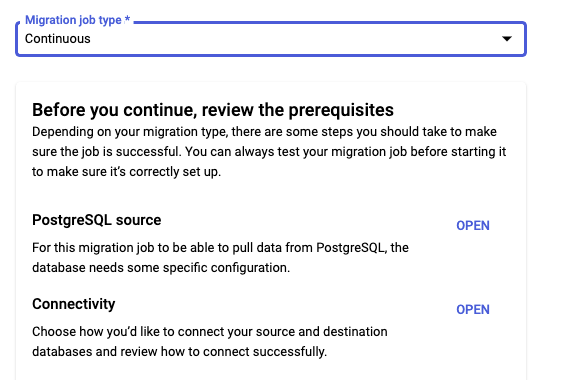
Create a new continuous Database Migration Service job.
As part of the migration job configuration, make sure that you specify the following properties for the destination Cloud SQL instance:
For the Connectivity Method, you must use VPC peering with the default VPC network.
Test and then start the continuous migration job.
If you do not correctly prepare the source PostgreSQL environment, the migration might fail completely, or it might fail to migrate some individual tables. If some tables are missing, even though the migration appears to be working otherwise, check that you have correctly configured all of the source database tables.
When the promotion is complete, the status of the job updates to Completed.
In this task you must configure the newly migrated Cloud SQL for PostgreSQL instance to support Cloud IAM users and IAM database authentication. You must also patch the Cloud SQL for PostgreSQL instance to add the public IP address of the postgres-vm virtual machine to the list of networks that are allowed to connect to the instance.
Patch the postgres-vm virtual machine.
postgres-vm virtual machine.In the
Grant SELECT permission to the Cloud IAM user for the
supersecret!. Then connect to the orders database using \c orders; command.supersecret!.Run the following query as the
In this task you must configure point-in-time recovery on a Cloud SQL for PostgreSQL instance and then test it by using point-in-time recovery to create a cloned instance at a point in time that rolls back some changes.
To complete this task you must complete the following steps:
supersecret!, then connect to the orders database using \c orders; command.supersecret!.orders.distribution_centers table.postgres-orders-pitr.The new instance will not be used, but do not discard it, as it will be required to confirm that you have correctly completed the lab.
You have migrated a standalone PostgreSQL database to Cloud SQL, enabled Cloud SQL IAM database authentication, and tested point-in-time database recovery.
This self-paced lab is part of the Create and Manage Cloud SQL for PostgreSQL Instances skill badge. Completing this skill badge earns you the badge above, to recognize your achievement. Share your badge on your resume and social platforms, and announce your accomplishment using #GoogleCloudBadge.
...helps you make the most of Google Cloud technologies. Our classes include technical skills and best practices to help you get up to speed quickly and continue your learning journey. We offer fundamental to advanced level training, with on-demand, live, and virtual options to suit your busy schedule. Certifications help you validate and prove your skill and expertise in Google Cloud technologies.
Manual Last Updated December 11, 2025
Lab Last Tested December 11, 2025
Copyright 2026 Google LLC. All rights reserved. Google and the Google logo are trademarks of Google LLC. All other company and product names may be trademarks of the respective companies with which they are associated.



This content is not currently available
We will notify you via email when it becomes available

Great!
We will contact you via email if it becomes available


One lab at a time
Confirm to end all existing labs and start this one