
시작하기 전에
- 실습에서는 정해진 기간 동안 Google Cloud 프로젝트와 리소스를 만듭니다.
- 실습에는 시간 제한이 있으며 일시중지 기능이 없습니다. 실습을 종료하면 처음부터 다시 시작해야 합니다.
- 화면 왼쪽 상단에서 실습 시작을 클릭하여 시작합니다.

Create a data clean room (publisher)
/ 25
Add data to the data clean room (publisher)
/ 25
Subscribe to the data clean room (subscriber)
/ 25
Query the data to test secure data sharing implementation (subscriber and publisher)
/ 25
Create a data clean room (publisher)
/ 25
Add data to the data clean room (publisher)
/ 25
Subscribe to the data clean room (subscriber)
/ 25
Query the data to test secure data sharing implementation (subscriber and publisher)
/ 25

Want to protect your sensitive data in BigQuery by restricting query access? With data clean rooms, you can now do that in an easily implemented and managed way! A data clean room is an environment to share sensitive data where raw access can be prevented and query restrictions can be enforced. Only users or groups that are added as subscribers to a data clean room can subscribe to the shared data. Data clean rooms provide a security-enhanced environment. Multiple parties can share, join, and analyze their data assets without moving or revealing the underlying data.
BigQuery data clean rooms are built on the BigQuery sharing (formerly Analytics Hub) platform. Standard BigQuery sharing data exchanges allow you to share data across organizations at scale. Data clean rooms help you address sensitive and protected data-sharing use cases. Specifically, data clean rooms provide additional security controls to help protect the underlying data and enforce analysis rules that the data owner defines.
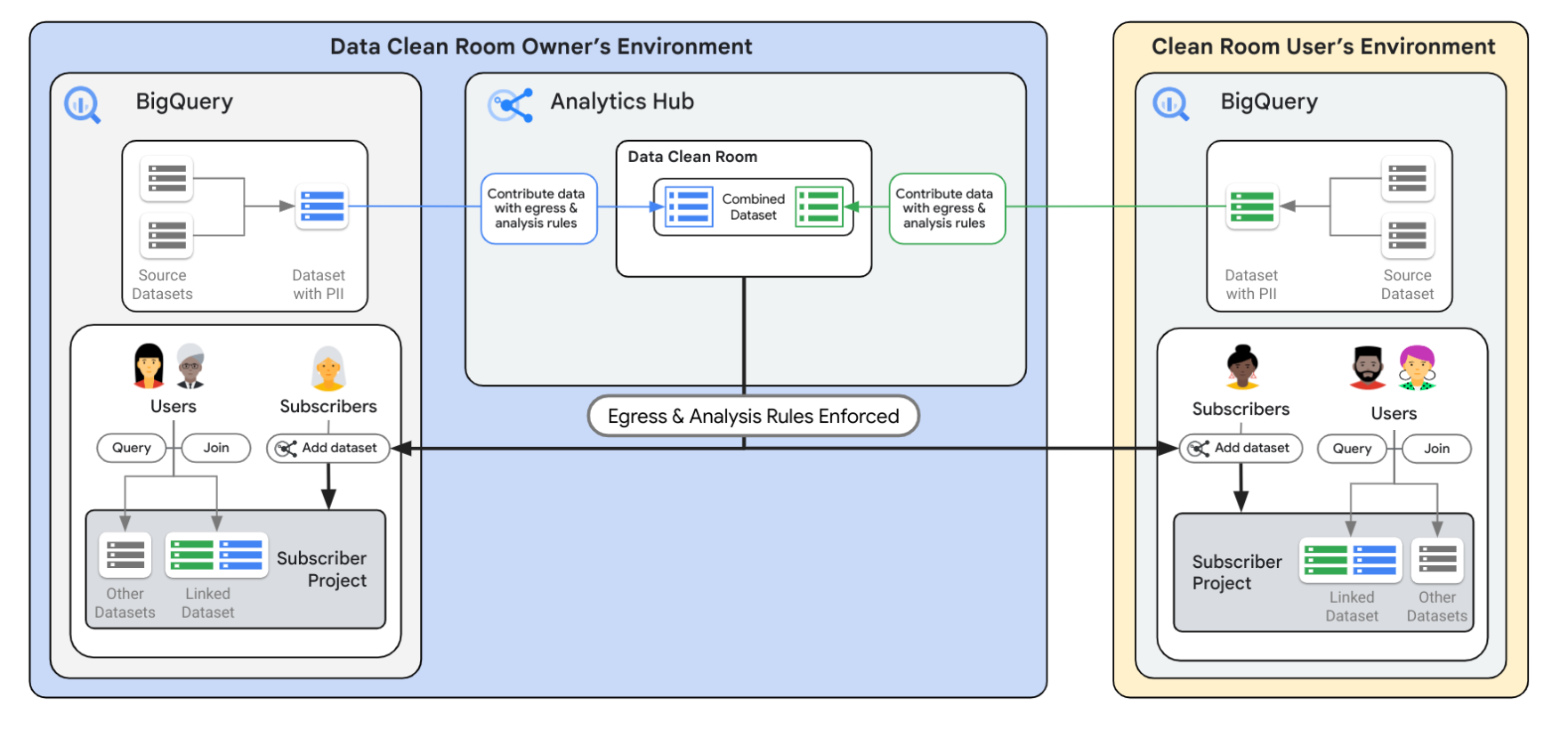
The following diagram provides an overview of the BigQuery sharing data exchange architecture. First, the owner creates and manages the data clean room through the BigQuery sharing platform. They add shareable data and grant access to specific users. Then, users who have been granted access can query data in the clean room from their own projects. The BigQuery sharing platform enforces access rules defined by the owner. These rules include differential privacy and privacy budgets.
Differential privacy is an anonymization technique that limits the personal information that is revealed in a query output. Differential privacy is considered to be one of the strongest privacy protections. To learn more, refer to the What is differential privacy? documentation.
The privacy budget is like a limit on how much noise you can add. Every time you perform a calculation or analysis on the data, you use up some of your privacy budget. Once the budget is spent, you can't add any more noise, and further analysis might risk revealing private information.
The privacy budget is controlled by an epsilon (ε) value established by the data clean room publisher.
In this lab, you learn how to perform the following tasks:
To complete this lab, you should be familiar with BigQuery.
Note: To begin this lab, follow the instructions to log into the Publisher project:
Read these instructions. Labs are timed and you cannot pause them. The timer, which starts when you click Start Lab, shows how long Google Cloud resources are made available to you.
This hands-on lab lets you do the lab activities in a real cloud environment, not in a simulation or demo environment. It does so by giving you new, temporary credentials you use to sign in and access Google Cloud for the duration of the lab.
To complete this lab, you need:
Click the Start Lab button. If you need to pay for the lab, a dialog opens for you to select your payment method. On the right is the Lab setup and access panel with the following:
Note that the lab timer is located near the top of the page, showing the remaining time.
Click Open Google Cloud console (or right-click and select Open Link in Incognito Window if you are running the Chrome browser).
The lab spins up resources, and then opens another tab that shows the Sign in page.
Tip: Arrange the tabs in separate windows, side-by-side.
If necessary, copy the Username below and paste it into the Sign in dialog.
You can also find the Username in the Lab setup and access panel.
Click Next.
Copy the Password below and paste it into the Welcome dialog.
You can also find the Password in the Lab setup and access panel.
Click Next.
Click through the subsequent pages:
After a few moments, the Google Cloud console opens in this tab.

For this task, be sure that you have logged into the Publisher project (
In this task, you act as the publisher (
On the Navigation menu (
Click Create clean room.
Create a secure environment for privacy-preserving analysis while restricting access to the underlying data with the following details:
| Parameter | Configuration |
|---|---|
| Project | |
| Location type | Multi-region |
| Multi-region | US (multiple regions in the United States) |
| Clean room name | |
| Primary contact | |
| Description | Patient Data Analysis |
Click Create clean room and leave the remaining settings as their defaults.
Use the following details in the Clean Room Permissions (optional) section to add the Publisher username as the clean room owner and the Subscriber username as data contributor and subscriber to the clean room.
| Parameter | Configuration |
|---|---|
| Clean room owners | |
| Data contributors |
|
| Subscribers |
Click Set permissions.
Locate the row for the clean room name named (
Click Add principal.
In the Add principals section, enter the subscriber username for the principal:
For Select a role, search for Analytics Hub Subscription Owner, and then select Analytics Hub Subscription Owner from the search results.
Click Save.
Click Check my progress to verify the objective.
For this task, be sure that you remain logged into the Publisher project (
In this task, you act as the publisher and clean room owner (covid_data with analysis rules implemented.
Click on the data clean room named
Click Add data.
When creating a view, you can choose all source data columns. Alternatively, select specific columns to include in the new view. For this data, you choose all the source columns as part of the new view in next steps.
In Source data, for Dataset, enter:
In Source data, for Table / view name, select county_14d.
Enable the option for Use all columns.
In Store new view, enter the view name: covid_data
In Metadata, enter the value for Primary contact:
Click Next.
In the Analysis rules section, use the following details to define analysis rules for the shared table named county_14d, and leave the remaining settings as their defaults:
| Parameter | Configuration |
|---|---|
| Rule type | Differential privacy |
| Filter | Enable Allow join on columns named county_fips_code and state_name; Enable Privacy unit column on column named new_deaths |
| Total epsilon | 1000 |
| Maximum epsilon per query | 15 |
| Total delta | 0.5 |
| Delta per query | 0.1 |
| Join condition | Join not required |
state_name as a join column and set new_deaths as a Privacy unit column, you need to expand the rows per page displayed or use that arrows at the bottom right of the table to see more column names.Click Next, and then review the configurations.
Click Add data.
covid_data is created for your data and is added as a listing to the data clean room named Leave the browser tab for the Publisher project open, as you proceed to the next task.
Click Check my progress to verify the objective.
For this task, be sure that you have logged into the Subscriber project (
Subscribers of a data clean room incur compute charges when querying shared data protected by a differential privacy rule. In this task, you explore how shared data is accessible in the Subscriber project. As the Subscriber (
In a new Incognito or private browser window, sign into the Subscriber Project (
On the Navigation menu (
Click Search listings.
In the Filters pane, under Listings, apply the filter for Clean rooms.
In the Results, click on the data clean room named
Click Subscribe.
For Project, enter the Subscriber Project ID:
Click Subscribe.
On the Navigation menu (
Expand the arrow next to the Subscriber Project ID (
Click on the subscribed clean room table named
Click Check my progress to verify the objective.
For this task, be sure that you query the data in BigQuery as the specified user (subscriber or publisher) in the specified project (subscriber or publisher) for each query, so that you can fully test that secure data sharing is working as intended.
When a differential privacy rule is applied to a shared table or view, users cannot directly query it using standard SQL. In this section, you act as the subscriber and use differential privacy to query the shared data instead of standard SQL.
For test 1, execute the following queries in the Subscriber project (
Output returns a message that differential privacy is being enforced:
SELECT WITH DIFFERENTIAL_PRIVACY:Output returns the desired count:
You have observed that users cannot directly query protected tables with standard SQL. They must explicitly include the WITH DIFFERENTIAL PRIVACY clause in their queries. This ensures that all queries adhere to the defined privacy protections.
Differential privacy adds slight noise to the values returned in query results, rather than showing the actual values. This noise helps to mask individual data points while preserving overall trends and insights. Users should be aware that the values they see are not the exact, raw values but instead are perturbed with some noise added for privacy.
For this first query below, execute it in Publisher project (
Output returns data with no noise:
| Row | county_name | count |
|---|---|---|
| 1 | Abbeville | 14 |
| 2 | Acadia | 14 |
| 3 | Accomack | 14 |
| 4 | Ada | 14 |
| 5 | Adair | 56 |
| 6 | Adams | 168 |
| 7 | Addison | 14 |
For the second query, execute it in the Subscriber project (
Output returns data with some minor noise:
| Row | county_name | count |
|---|---|---|
| 1 | Abbeville | 14 |
| 2 | Acadia | 14 |
| 3 | Accomack | 14 |
| 4 | Ada | 13 |
| 5 | Adair | 55 |
| 6 | Adams | 167 |
| 7 | Addison | 15 |
The noise, or difference between the raw data and differentially private data, is due to the epsilon (ε) value established by the data clean room publisher. In this case, a higher epsilon value results in less noise, so the difference between the raw and subscribed data is minor, but a data clean room publisher can increase the epsilon value as desired for their use case.
For test 3, execute the following query in the Subscriber project (
A significant advantage of using differential privacy in BigQuery sharing is the granular control it offers over data joins. Publishers specify which columns are allowed in joins. This prevents sensitive data combinations from being revealed. Previously, as the publisher, you only allowed state_name and country_fips_code columns for join. In tests 3 and 4, you query the data to test granular control over data joins.
In this case, you are able to perform a join and get the results using the state_name column.
| Row | county_name | state_name | new_deaths_count |
|---|---|---|---|
| 1 | Mcpherson | Nebraska | 53428 |
| 2 | Motley | Texas | 140563 |
| 3 | Jerauld | South Dakota | 39619 |
| 4 | Catron | New Mexico | 19056 |
| 5 | Smith | Kansas | 60030 |
| 6 | Adair | Iowa | 62562 |
| 7 | Jack | Texas | 147420 |
| 8 | Colfax | Nebraska | 53792 |
| 9 | Ballard | Kentucky | 61495 |
| 10 | Pecos | Texas | 155751 |
For test 4, execute the query in the Subscriber project (
In this section, you attempt to execute a query with join conditions on a restricted column named forecast_date.
Output returns a message that joins are not allowed on the restricted column:
Publishers retain control over how shared data is used, even with differential privacy applied. They can restrict users' ability to copy or export the data, ensuring that the data remains within the secure environment of BigQuery sharing.
For test 5, execute the query in the Subscriber project (
Each differential privacy rule has a privacy budget that gets consumed with every query. Once this budget is exhausted, subscribers of the clean room cannot query your shared data. This mechanism prevents excessive information leakage and enforces privacy limits. In this section, you run additional queries to test the privacy budget.
Output indicates that the privacy budget has been reached:
Click Check my progress to verify the objective.
You have successfully enabled secure data sharing while protecting individual privacy with differential privacy in data clean rooms.
...helps you make the most of Google Cloud technologies. Our classes include technical skills and best practices to help you get up to speed quickly and continue your learning journey. We offer fundamental to advanced level training, with on-demand, live, and virtual options to suit your busy schedule. Certifications help you validate and prove your skill and expertise in Google Cloud technologies.
Manual Last Updated May 27, 2026
Lab Last Tested May 27, 2026
Copyright 2026 Google LLC. All rights reserved. Google and the Google logo are trademarks of Google LLC. All other company and product names may be trademarks of the respective companies with which they are associated.



현재 이 콘텐츠를 이용할 수 없습니다
이용할 수 있게 되면 이메일로 알려드리겠습니다.

감사합니다
이용할 수 있게 되면 이메일로 알려드리겠습니다.


한 번에 실습 1개만 가능
모든 기존 실습을 종료하고 이 실습을 시작할지 확인하세요.
실습을 시작하려면 이 간단한 단계를 완료하세요.