

Before you begin
- Labs create a Google Cloud project and resources for a fixed time
- Labs have a time limit and no pause feature. If you end the lab, you'll have to restart from the beginning.
- On the top left of your screen, click Start lab to begin

Remove the overly permissive rules
/ 10
Start the bastion host instance
/ 10
Create a firewall rule that allows SSH (tcp/22) from the IAP service and add network tag on bastion
/ 20
Create a firewall rule that allows traffic on HTTP (tcp/80) to any address and add network tag on juice-shop
/ 20
Create a firewall rule that allows traffic on SSH (tcp/22) from acme-mgmt-subnet network address and add network tag on juice-shop
/ 20
SSH to bastion host via IAP and juice-shop via bastion
/ 20
Remove the overly permissive rules
/ 10
Start the bastion host instance
/ 10
Create a firewall rule that allows SSH (tcp/22) from the IAP service and add network tag on bastion
/ 20
Create a firewall rule that allows traffic on HTTP (tcp/80) to any address and add network tag on juice-shop
/ 20
Create a firewall rule that allows traffic on SSH (tcp/22) from acme-mgmt-subnet network address and add network tag on juice-shop
/ 20
SSH to bastion host via IAP and juice-shop via bastion
/ 20

在挑戰研究室中,您會在特定情境下完成一系列任務。挑戰研究室不會提供逐步說明,您將運用從課程研究室學到的技巧,自行找出方法完成任務!自動評分系統 (如本頁所示) 將根據您是否正確完成任務來提供意見回饋。
在您完成任務的期間,挑戰研究室不會介紹新的 Google Cloud 概念。您須靈活運用所學技巧,例如變更預設值或詳讀並研究錯誤訊息,解決遇到的問題。
若想滿分達標,就必須在時限內成功完成所有任務!
這個實驗室適合建構安全的 Google Cloud 網路技能徽章課程的學員。準備好迎接挑戰了嗎?
請詳閱以下操作說明。實驗室活動會計時,且中途無法暫停。點選「Start Lab」後就會開始計時,顯示可使用 Google Cloud 資源的時間。
您將在真正的雲端環境完成實作實驗室活動,而不是模擬或示範環境。為此,我們會提供新的暫時憑證,供您在實驗室活動期間登入及存取 Google Cloud。
為了順利完成這個實驗室,請先確認:
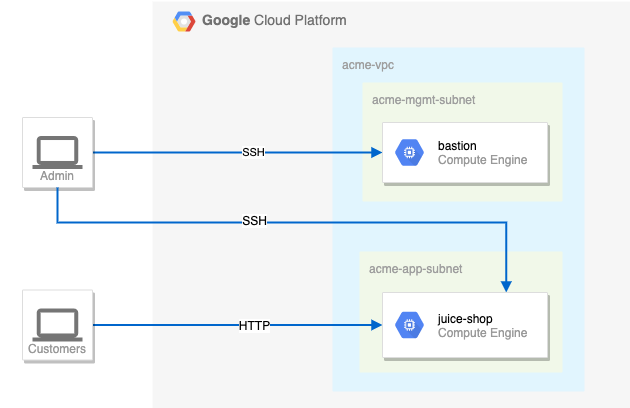
您是 Jeff 聘請的資安顧問,他在當地經營一間小公司,且網站 (juice-shop) 非常成功,他希望您能協助提升網站的安全性。Jeff 剛接觸 Google Cloud,並請鄰居的兒子建立了網站雛形。對方上大學後無法繼續作業,但離開前已確保網站能正常運作。
以下為目前的設定:
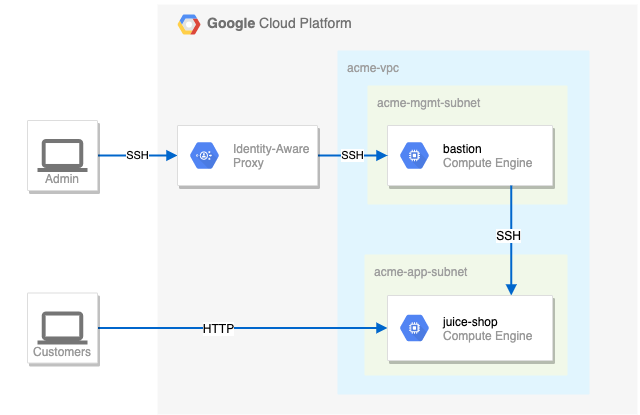
您需要為 Jeff 的網站建立合適的安全性設定。第一項挑戰是設定防火牆規則和虛擬機器標記。您也需要確保只能透過 IAP 使用 SSH 連至防禦主機。
關於防火牆規則,請確認:
juice-shop。juice-shop 提出請求。提示與祕訣:
建議的行動順序
juice-shop 伺服器透過 HTTP 提供流量。建立防火牆規則,允許傳送到任何位址的 HTTP (tcp/80) 流量。必須啟用防火牆規則,讓 juice-shop 執行個體使用 juice-shop。建立防火牆規則,允許來自 acme-mgmt-subnet 網路位址的 SSH (tcp/22) 流量。必須啟用防火牆規則,讓 juice-shop 執行個體使用 juice-shop。您已完成挑戰實驗室,並幫助 Jeff 提升了網站安全性。
這個技能徽章課程是 Google Cloud 的網路工程師和資安工程師學習路徑的一部分。如果您已完成路徑中其他技能徽章課程,歡迎瀏覽 Google Skills 目錄,查看其他可參加的課程,共有超過 20 堂可供學習。
協助您瞭解如何充分運用 Google Cloud 的技術。我們的課程會介紹專業技能和最佳做法,讓您可以快速掌握要領並持續進修。我們提供從基本到進階等級的訓練課程,並有隨選、線上和虛擬課程等選項,方便您抽空參加。認證可協助您驗證及證明自己在 Google Cloud 技術方面的技能和專業知識。
使用手冊上次更新日期:2025 年 2 月 4 日
使用手冊上次測試日期:2025 年 2 月 4 日
Copyright 2026 Google LLC 保留所有權利。Google 和 Google 標誌是 Google LLC 的商標,其他公司和產品名稱則有可能是其關聯公司的商標。



This content is not currently available
We will notify you via email when it becomes available

Great!
We will contact you via email if it becomes available


One lab at a time
Confirm to end all existing labs and start this one
Complete this quick step to start your lab.