
Before you begin
- Labs create a Google Cloud project and resources for a fixed time
- Labs have a time limit and no pause feature. If you end the lab, you'll have to restart from the beginning.
- On the top left of your screen, click Start lab to begin

Firestore Database Create
/ 10
Firestore Database Populate
/ 10
Cloud Build Rest API Staging
/ 20
Cloud Build Rest API Production
/ 20
Cloud Build Frontend Staging
/ 20
Cloud Build Frontend Production
/ 20
Firestore Database Create
/ 10
Firestore Database Populate
/ 10
Cloud Build Rest API Staging
/ 20
Cloud Build Rest API Production
/ 20
Cloud Build Frontend Staging
/ 20
Cloud Build Frontend Production
/ 20

In a challenge lab you’re given a scenario and a set of tasks. Instead of following step-by-step instructions, you will use the skills learned from the labs in the course to figure out how to complete the tasks on your own! An automated scoring system (shown on this page) will provide feedback on whether you have completed your tasks correctly.
When you take a challenge lab, you will not be taught new Google Cloud concepts. You are expected to extend your learned skills, like changing default values and reading and researching error messages to fix your own mistakes.
To score 100% you must successfully complete all tasks within the time period!
This lab is recommended for students who are enrolled in the Develop Serverless Apps with Firebase course. Are you ready for the challenge?
Read these instructions. Labs are timed and you cannot pause them. The timer, which starts when you click Start Lab, shows how long Google Cloud resources are made available to you.
This hands-on lab lets you do the lab activities in a real cloud environment, not in a simulation or demo environment. It does so by giving you new, temporary credentials you use to sign in and access Google Cloud for the duration of the lab.
To complete this lab, you need:
Cymbal is expanding its digital services to include a "Retro Cinema" archive. They have acquired a massive historical dataset containing details of thousands of Netflix shows and movies. However, their current infrastructure cannot handle the search queries or scale required for global access.
To solve this, the development team has decided to move to a serverless architecture. They need a system that can ingest the Netflix CSV data, store it in a scalable NoSQL database, and provide a REST API for a web-based frontend.
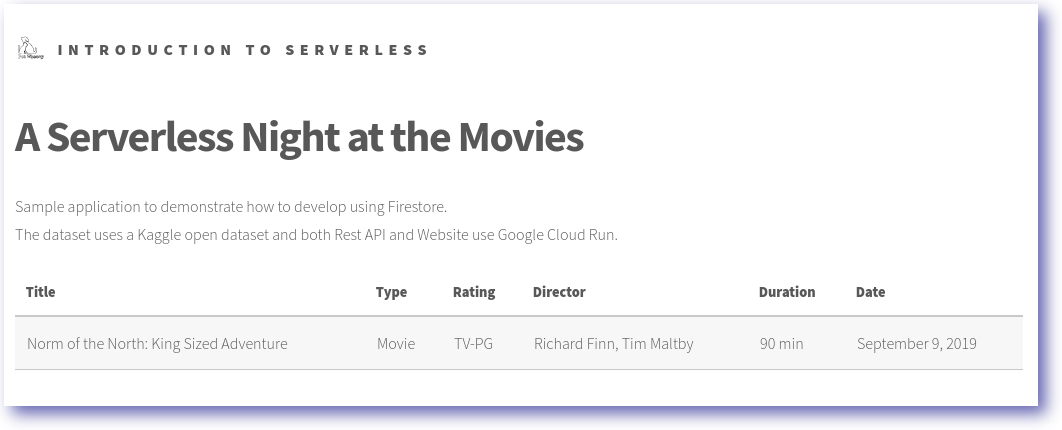
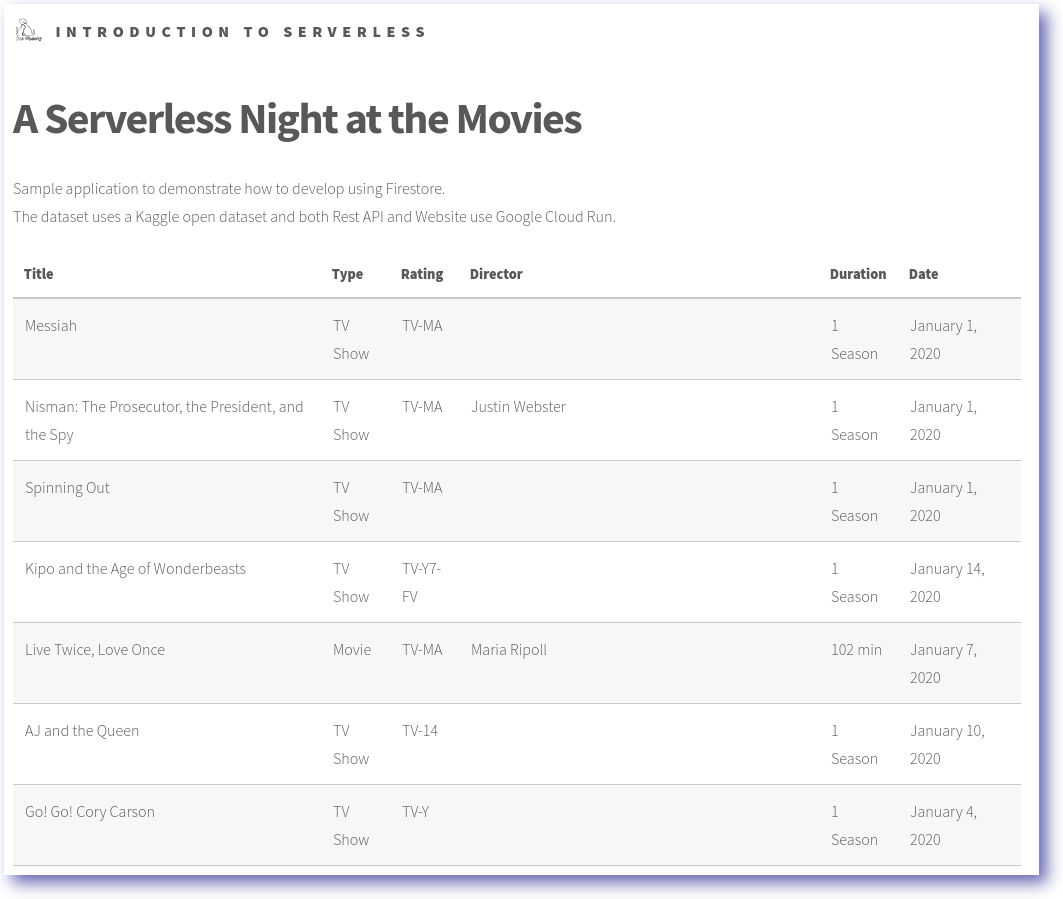
As a developer in Cymbal's digital services, you are tasked with building this end-to-end solution. You provision a Cloud Firestore database, import the Netflix dataset, and deploy both a backend API and a frontend application using Cloud Run. Your final goal is to ensure the production frontend can dynamically filter and display Netflix titles based on their release year.
In this task, you create a Firestore database in Native mode to store the Netflix media records.
When you create the Firestore database, configure it with the following:
Click Check my progress to verify that you've performed the above task.
In this task, use a Node.js script to import the Netflix CSV dataset into your Firestore collection.
Example Firestore schema:
| Collection | Document | Field |
|---|---|---|
| data | 70234439 | [dataset] |
The Netflix Shows Dataset includes the following information:
| Field | Description |
|---|---|
| show_id: | Unique ID for every Movie / Tv Show |
| type: | Identifier - A Movie or TV Show |
| title: | Title of the Movie / Tv Show |
| director: | Director of the Movie |
| cast: | Actors involved in the movie / show |
| country: | Country where the movie / show was produced |
| date_added: | Date it was added on Netflix |
| release_year: | Actual release year of the movie / show |
| rating: | TV Rating of the movie / show |
| duration: | Total Duration - in minutes or number of seasons |
To populate the database, perform the following:
pet-theory/lab06/firebase-import-csv/solution:pet-theory/lab06/firebase-import-csv/solution/index.js:Click Check my progress to verify that you've performed the above task.
In this task, you containerize and deploy a baseline REST API to Cloud Run to prepare for database integration.
| Field | Value |
|---|---|
| Artifact Registry repository name | rest-api-repo |
| Artifact Registry image | rest-api:0.1 |
| Cloud Run service | netflix-dataset-service |
| Permission | --allow-unauthenticated |
To create the REST API, implement the following tasks:
pet-theory/lab06/firebase-rest-api/solution-01.SERVICE_URL=copy url from your netflix-dataset-service curl -X GET $SERVICE_URL should respond with: {"status":"Netflix Dataset! Make a query."}Click Check my progress to verify that you've performed the above task.
In this task, you deploy an updated version of the API that queries the Netflix data directly from Firestore.
| Field | Value |
|---|---|
| Artifact Registry Image | rest-api:0.2 |
| Cloud Run service | netflix-dataset-service |
| Permission | --allow-unauthenticated |
Use Cloud Build to create an updated container image and deploy the new revision to Cloud Run:
pet-theory/lab06/firebase-rest-api/solution-02.SERVICE_URL=copy url from your netflix-dataset-service curl -X GET $SERVICE_URL/2019 should respond with json datasetClick Check my progress to verify that you've performed the above task.
In this task, use Cloud Build to package the staging application and deploy it as a Cloud Run service.
For the frontend, use the following information:
| Field | Value |
|---|---|
| REST_API_SERVICE | REST API SERVICE URL |
| Artifact Registry image | frontend-staging:0.1 |
| Cloud Run service | frontend-staging-service |
Package and deploy the application as a Cloud Run service:
pet-theory/lab06/firebase-frontend.Click Check my progress to verify that you've performed the above task.
In this task, update the frontend logic to fetch real-world data and deploy the final production version of the Netflix browser.
| Field | Value |
|---|---|
| REST_API_SERVICE | REST API SERVICE URL |
| Artifact Registry image | frontend-production:0.1 |
| Cloud Run service | frontend-production-service |
To complete this section successfully, you are required to implement the following tasks:
pet-theory/lab06/firebase-frontend/public.public directory, update app.js to use the REST API.Now that the services have been deployed you will be able to see the contents of the Firestore database using the frontend service.
Click Check my progress to verify that you've performed the above task.
Congratulations! In this lab, you have successfully created a Firestore database, populated it with data, created a REST API, and deployed a frontend application that interacts with the Firestore database and REST API. You also learned how to deploy a staging and production frontend application.
This self-paced lab is part of the Develop Serverless Apps with Firebase skill badge course. Completing this skill badge course earns you the badge above, to recognize your achievement. Share your badge on your resume and social platforms, and announce your accomplishment using #GoogleCloudBadge.
...helps you make the most of Google Cloud technologies. Our classes include technical skills and best practices to help you get up to speed quickly and continue your learning journey. We offer fundamental to advanced level training, with on-demand, live, and virtual options to suit your busy schedule. Certifications help you validate and prove your skill and expertise in Google Cloud technologies.
Manual Last Updated May 12, 2026
Lab Last Tested May 12, 2026
Copyright 2026 Google LLC. All rights reserved. Google and the Google logo are trademarks of Google LLC. All other company and product names may be trademarks of the respective companies with which they are associated.



This content is not currently available
We will notify you via email when it becomes available

Great!
We will contact you via email if it becomes available


One lab at a time
Confirm to end all existing labs and start this one
Complete this quick step to start your lab.